Team Career Plan B · July 9, 2026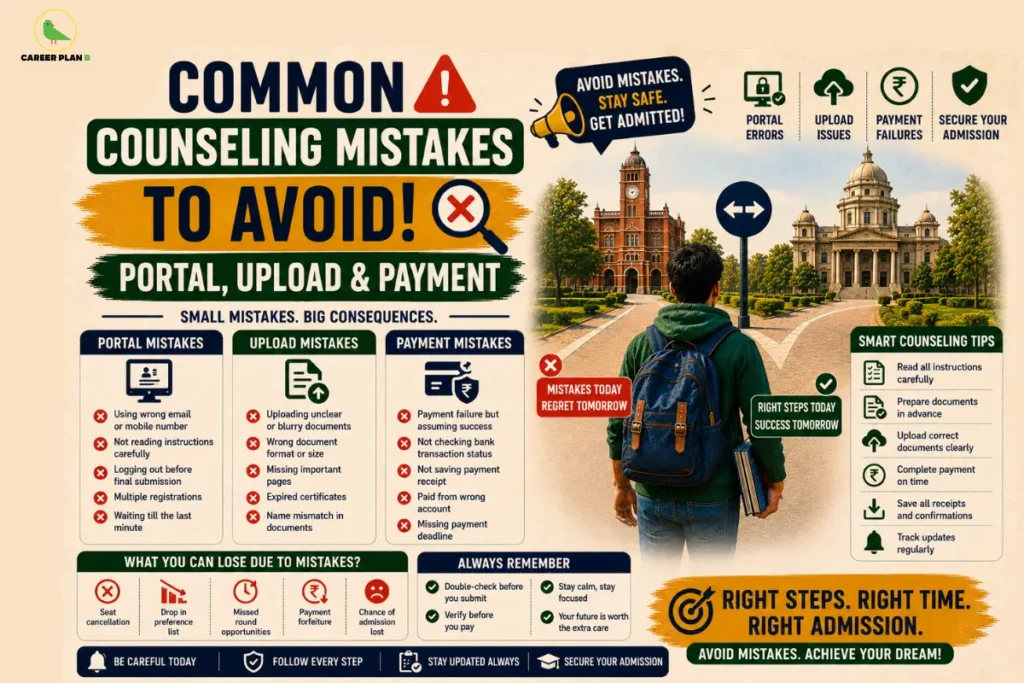
Introduction
Every year, thousands of students work hard, clear their entrance exams, and still end up losing their dream seat not because of their scores, but because of a missed click, a wrong file, or a failed payment. The common counseling mistakes that happen during the admission process are more widespread than anyone talks about, and the worst part is, most of them are completely avoidable. If you are a student going through counseling right now, or a parent sitting beside your child trying to make sense of it all, this one is for you.
This blog walks you through the most frequent counseling mistakes students make on admission portals, during document uploads, and at the payment stage and more importantly, how to not be that student. Because getting the seat you deserve should not depend on whether you knew the right steps at the right time.
Why the Counseling Process Feels So Overwhelming
It’s Not Just You — The System Is Complicated
Let’s be honest. The first time you land on a counseling portal, it does not exactly welcome you with open arms. There are tabs you don’t recognize, deadlines that seem to change, and instructions written in language that feels like it was designed for someone who already knows what they’re doing.
Most students enter this process alone or with parents who are navigating it for the first time too. And that combination of high stakes, confusing interfaces, and tight timelines is exactly where mistakes begin. According to the Joint Seat Allocation Authority (JoSAA), one of India’s largest centralized counseling bodies, thousands of registered candidates do not complete all steps of the process each year leaving seats vacant that could have been theirs.
It doesn’t mean they weren’t smart enough. It means no one told them what to watch out for.
Portal Mistakes That Can Cost You Your Seat
This is where the journey usually goes sideways first. The portal is your gateway to everything and a single error here can set off a chain reaction that affects the rest of your admission.
Wrong Login Credentials or Registration Details
It sounds too simple to be a real problem, right? But it is. Students frequently mix up their application number with their roll number, or enter their date of birth in the wrong format. Some register with a temporary email ID they no longer have access to, and then cannot retrieve OTPs or confirmation links when it matters most.
The fix is simple but it needs to happen before the rush: save your registration details in one place, use a permanent email ID, and double-check every field before hitting submit. The National Testing Agency (NTA) consistently advises students to use a valid, active email and mobile number during registration because every critical communication flows through those two points of contact.
Missing the Reporting or Choice-Filling Window
Counseling rounds move fast. There is usually a window of 24 to 72 hours for choice filling, and if you miss it, you are out of that round — no exceptions, no extensions. Students often assume they have more time than they actually do, especially when balancing multiple counseling processes at once.
Mark every single deadline in your phone calendar with an alert the day before. Not the day of — the day before. Because on the actual deadline day, the portal is often slow due to traffic, and that one-hour difference can matter.
Not Locking Your Choices in Time
This one is heartbreaking to see happen. A student spends hours carefully arranging their college preferences, and then forgets to click “Lock Choices.” The system does not automatically save your final order as confirmed you have to lock it. And an unlocked preference list is treated as incomplete.
Always lock your choices before the window closes. Take a screenshot immediately after. That screenshot is your proof.
Document Upload Errors Students Regret Later
Once you are past the portal stage, documents become the next battlefield. The rules here are stricter than they seem, and portals are not forgiving about format or accuracy.
Wrong File Format or Size
Most portals accept only PDF or JPEG files within a specific size range — often between 50 KB and 300 KB. Students frequently upload PNG files, scanned documents that are too large, or photos taken in low light that are not legible enough to be accepted.
Before uploading anything, read the file specification section of the portal carefully. The Medical Counselling Committee (MCC), which handles NEET UG and PG counseling, clearly lists the accepted file types and size limits in its information bulletin — always refer to the official bulletin first.
Mismatched Name or Details Across Documents
Your name on your Class 10 certificate, your Aadhaar card, and your entrance exam admit card must match exactly. Even a small variation like “Anjali” on one document and “Anjali Kumari” on another can trigger a verification hold that delays your admission or leads to rejection.
If there is a discrepancy, get it corrected before counseling begins. Do not wait until the upload stage to discover it.
Uploading Outdated or Unattested Certificates
Some students upload certificates from an older academic year, or income certificates that have crossed their validity date. Others forget that certain documents like domicile or caste certificates need to be attested by a gazetted officer to be considered valid.
Read the document checklist provided by the specific counseling authority you are applying under. Each body has its own requirements, and what works for one may not work for another.
Payment Pitfalls No One Warns You About
You’ve cleared the portal. You’ve uploaded your documents. Now comes the payment and this stage has its own set of traps.
Failed Transactions and No Follow-Up
Online payment failures happen more often than you’d think, especially when thousands of students are transacting simultaneously on the same portal. The money may get debited from your account, but the portal shows “payment pending” or “failed.”
If this happens, do not panic and do not pay again immediately. Wait for the stipulated reversal time mentioned on the portal — usually 48 to 72 hours. If the amount is not reversed, contact the counseling helpline with your transaction ID and bank statement. Most portals like JoSAA and MCC have dedicated help desk numbers and email IDs for exactly this situation.
Paying the Wrong Fee Head
Some students, especially those applying to state counseling portals, encounter multiple fee heads — registration fee, seat acceptance fee, and security deposit. Paying the wrong one, or paying only one when two are required, can mark your admission as incomplete.
Read the fee structure table carefully before initiating any payment. Take nothing for granted just because the amount seems right.
Missing the Payment Confirmation Screenshot
Once a payment goes through, save the confirmation page immediately as a screenshot and as a downloaded PDF if the option is available. Payment confirmation emails sometimes land in spam folders, and portal histories can be hard to navigate later.
Your payment confirmation is as important as your allotment letter. Treat it that way.
For Personalized Guidance
Quick Checklist Before You Submit Anything
Before you click that final submit button at any stage of counseling, run through this:
- Is your login email and mobile number active and accessible?
- Have you noted all deadlines with a one-day-prior reminder?
- Are your documents in the correct file format and within the size limit?
- Do your name and details match exactly across all documents?
- Have you locked your choice preferences — not just saved them?
- Have you paid the correct fee head and saved the confirmation?
- Have you taken screenshots of every completed step?
If the answer to even one of these is “I’m not sure” — go back and check before submitting.
How Career Plan B Helps
Career Plan B helps students navigate the counselling and admission process with clarity, confidence, and expert guidance at every step:
- Personalized Career Counselling: Helps students understand their options, evaluate opportunities, and make informed decisions based on their strengths, interests, and long-term goals.
- Psycheintel & Career Assessment Tests: Provides data-backed insights into aptitude, personality traits, learning styles, and suitable academic and career pathways.
- Admission & Academic Profile Guidance: Supports students through every stage of the counselling process—from registration and document preparation to preference filling, seat allotment decisions, and final admission formalities.
- Career Roadmapping: Helps students create a structured long-term plan that connects their academic choices with future career aspirations and opportunities.
- End-to-End Guidance: Assists students throughout counselling, admissions, and career planning so they can avoid costly mistakes, meet critical deadlines, and make confident decisions at every stage.
For Latest Information
Frequently Asked Questions
Q1. What should I do if my counseling portal login is not working?
Start by resetting your password using the registered email or mobile number. If that doesn’t work, contact the portal’s official helpdesk immediately — do not wait. Most counseling bodies like JoSAA and MCC have helpline numbers listed on their official websites.
Q2. Can I change my document after uploading the wrong one?
In most cases, yes but only within the document correction window that counseling authorities typically open after the initial upload period. Keep checking the official portal for any such announcement. Do not assume the window will be available; upload correctly the first time.
Q3. My payment was deducted but the portal shows failed. What should I do?
Do not make a second payment immediately. Note your transaction ID and wait for the reversal window mentioned on the portal (usually 48 to 72 hours). If unresolved, write to the official helpdesk with your bank statement as proof.
Q4. What happens if I forget to lock my choices?
An unlocked choice list is generally treated as not submitted. You will either be excluded from that round or assigned a random allotment, depending on the portal’s rules. Always lock, and always screenshot.
Conclusion
The counseling process is already stressful enough without having to undo mistakes that could have been avoided. Every step — the portal, the documents, the payment has its own set of rules, and the students who sail through are usually the ones who knew those rules before they began, not after. You’ve worked too hard to let a formatting error or a missed deadline stand between you and your future.
So take a breath, make your checklist, and go through every step with intention. This is not just an administrative process, it is the bridge between where you are and where you want to be. Cross it carefully, and you will be just fine.